A Practical Guide on How to Use OpenAI ChatGPT for Website Design

13minutes read
chatGPT 4 for website design

Designing a successful website is less of a technical hurdle and more of a key business strategy. Thatʼs because companies now must launch quickly, ensure unified messaging, and make confident user experience (UX) choices without impeding internal operations. A lot of users share their experiences of using ChatGPT to build entire websites—often imperfect but surprisingly effective. This highlights AI's crucial benefit: it's a powerful tool for rapidly validating ideas before committing significant time and resources.

At Gapsy Studio, we explore how ChatGPT strengthens modern web design workflows and why it’s becoming increasingly relevant for founders, marketing teams, product owners, and decision-makers. From shaping brand messaging to improving content quality and stress-testing early concepts, understanding how to use ChatGPT for website design can accelerate planning and execution.
Can ChatGPT Design a Website That Works?

Building websites with ChatGPT offers a fast lane for testing ideas, not a shortcut to a final product. While invaluable for outlining UX logic and structuring scattered thoughts, it acts as a blueprint rather than a build. Realizing a polished, conversion-ready website that meets strict business standards still demands the nuance of human expertise.

What ChatGPT Can Do in Website Design

Here’s where ChatGPT website design becomes a powerful tool for businesses:

1. Generate website layouts and wireframe ideas

You can describe your industry, goals, and target audience, and ChatGPT will produce page structures and layout concepts. It’s not pixel-perfect, but it speeds up early planning by giving teams something concrete to react to.

2. Suggest sections, content flow, and UX logic

Need a clear homepage hierarchy? A streamlined landing page? ChatGPT can propose logical flows: hero → value → proof → offer → CTA, helping businesses move from vague vision to structured thinking.

3. Create messaging, headlines, and CTAs

A strong copy is essential. ChatGPT quickly generates multiple variations you can test, refine, or hand off to a content strategist.

4. Provide design directions using prompts

It can suggest color palettes, typography directions, UI style references, or component ideas — useful for shaping a design brief before the first mockup exists.

5. Turn vague ideas into a structured plan

ChatGPT excels at transforming broad statements like “We want to look more premium” into specific UX recommendations, content plans, or feature lists.

6. Pair well with no-code tools (Wix, Webflow)

It offers a quick way to get setup tips and code snippets, but it lacks the nuance for final delivery. Using ChatGPT for full web development often results in UX flaws that need manual correction. The tool is a powerful accelerator, but not a replacement for professional implementation.

Gapsy uses AI tools at the planning stage to create early content drafts, sitemap outlines, and UX hypotheses. It speeds up stakeholder communication and gives teams clarity before design begins.

What ChatGPT Cannot Do

Even with powerful AI, there are clear limitations every business should understand:

1. It doesn’t fully understand brand identity

ChatGPT can describe a style, but it cannot translate your brand’s personality into a cohesive visual system.

2. It can’t guarantee modern UI/UX quality

GPT’s UI/UX design layouts look functional but usually lack the polish, creativity, and consistency expected from serious products.

3. It often produces generic or outdated designs

Because its output is pattern-based, the suggestions can feel repetitive, which is good for ideation, not for differentiation.

4. It struggles with accessibility and mobile behavior

Contrast ratios, tap targets, responsive scaling—these nuanced decisions require expertise and testing.

5. It makes technical mistakes

Expect code errors, layout inconsistencies, and occasionally incorrect instructions for platforms like Webflow or Wix.

6. It cannot replace a professional designer

A great designer balances brand identity, user psychology, interaction design, and business goals. AI alone cannot replicate that level of strategic decision-making.

When businesses rely solely on ChatGPT for website design, they often return with the same complaint: “It gave us a direction, but everything looked off. We spent hours fixing it.”

ChatGPT is a partner in brainstorming, not a substitute for expertise.

Create a converting and engaging website with Gapsy — we’re one click away.

What ChatGPT 4 Can Do for Your Website Project

ChatGPT 4 acts as a strategic accelerator for website planning. While it does not replace a professional design team, it significantly reduces early friction. By drafting website sections and refining brand messaging rapidly, GPT provides a solid foundation that helps stakeholders align before the heavy lifting of the design phase begins.

Generate Website Layouts and Wireframe Ideas Quickly

ChatGPT helps teams move from vague ideas to structured website outlines without getting stuck at the starting line. It can:

  • Map out website architecture

  • Suggest section order and content flow

  • Produce simple wireframe concepts

  • Deliver first-draft layouts that remove blank-page paralysis

Business value: Faster early planning, clearer structure, and less time spent aligning on the basics.

Support Faster Content and Messaging Creation

ChatGPT accelerates content production by generating:

  • Headlines and subheaders

  • Calls to action

  • Landing page copy

  • Product descriptions

  • FAQs

  • Value propositions

Business value: Shorter go-to-market timelines, sharper messaging, and fewer copywriting bottlenecks.

Help Non-Designers Clarify Their Vision Before Hiring a Team

Teams use ChatGPT to shape ideas before involving designers or developers. For example:

  • Founders prototype website concepts

  • Marketers draft landing pages for campaigns

  • Executives compare multiple creative directions instantly

Business value: Better alignment and fewer revisions once the design team joins the project.

Speed Up Stakeholder Alignment and Decision-Making

ChatGPT provides quick variations and alternatives, helping teams accelerate early decisions. It enables them to:

  • Generate multiple concepts on demand

  • Compare different approaches quickly

  • Reduce unnecessary meetings

  • Start projects with clearer direction

Business value: Less time wasted in the planning phase and faster overall kickoff.

How to Design a Website With ChatGPT: A Step-by-Step Approach

In our experience, alignment eats up more time than design. You can leverage ChatGPT 4 to fix this. By using it to organize complex information and define goals early, it’s possible to cut down on the back-and-forth. This helps designers move into Figma with a clear roadmap rather than a blank canvas.

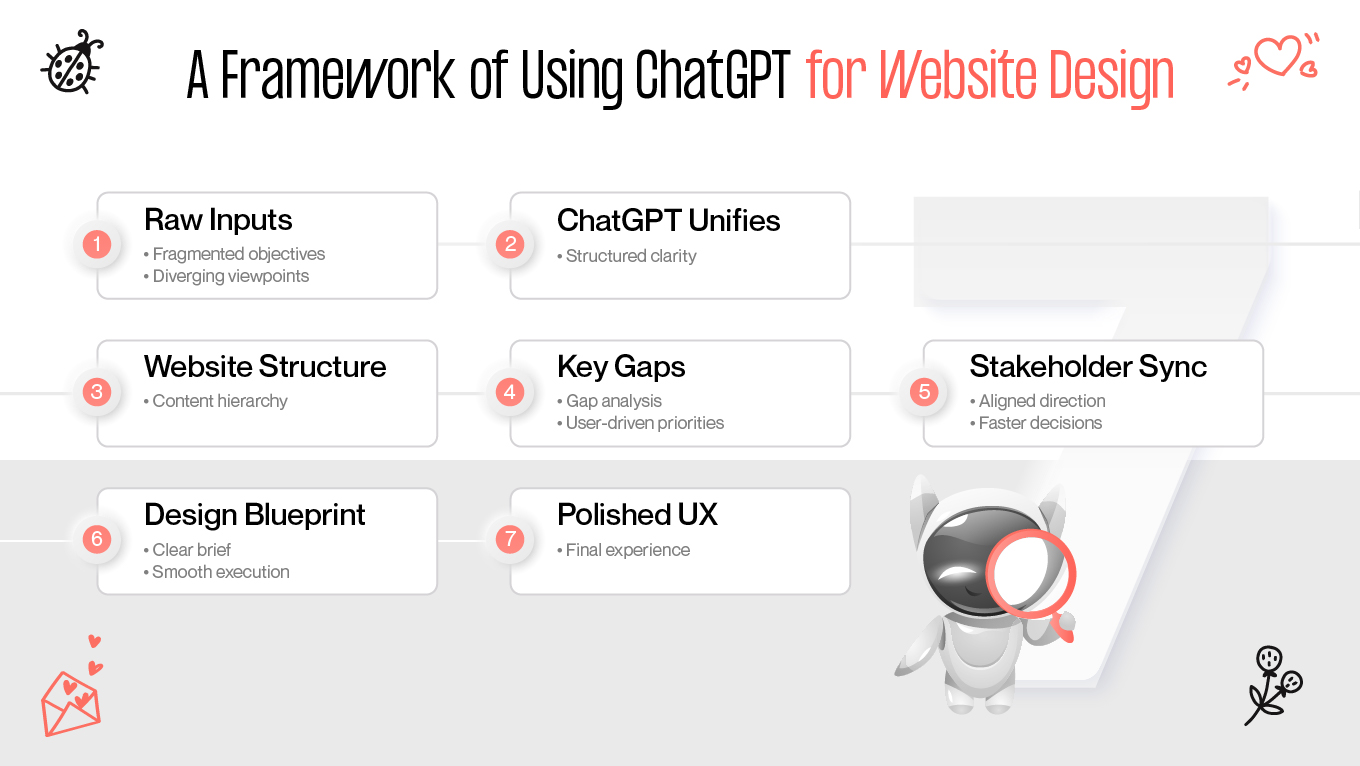
Step 1: Align Internal Understanding Before Design Starts

Businesses frequently underestimate how fragmented their internal knowledge is. Marketing, product, and leadership teams hold different perspectives on what the website should communicate.

Use ChatGPT as a consolidation tool, not to “generate ideas,” but to bring all voices into one coherent narrative.

It synthesis:

  • audience definitions,

  • positioning statements,

  • product explanations,

  • business goals.

Teams move significantly faster when everyone agrees on the story the website must tell before design begins.

Step 2: Translate Business Goals Into an Initial Site Narrative

Structure is strategy. If the layout doesn't lead the user, the site fails. Success comes when the website structure mirrors the intended business goals, making the path from entry to action obvious.

ChatGPT helps transform objectives into a logical narrative:

  • what users should learn first,

  • what builds trust next,

  • what frameworks support conversion,

  • what differentiators need emphasis.

This narrative phase is often skipped because it’s time-consuming. With ChatGPT, teams finally give it the attention it deserves — and the design phase becomes smoother as a result.

Step 3: Identify Structural Gaps and Overlooked Content

Even established companies uncover inconsistencies once we start mapping content. ChatGPT is effective at analyzing the planned structure and spotting:

  • missing supporting points,

  • duplicated messaging,

  • unclear value sections,

  • gaps in trust-building elements.

AI reveals blind spots teams didn’t realize they had. Fixing these early prevents expensive revisions later in the design or development process.

Step 4: Prioritize Information Around Real User Intent

While ChatGPT can’t replace UX expertise, it can help challenge assumptions about what users need on each page. It helps sort information by:

  • what drives decision-making,

  • what reduces friction,

  • what signals credibility,

  • what supports different audience segments.

It is easy to build a site that mirrors an org chart rather than a customer journey. ChatGPT acts as an objective filter, breaking internal bias and realigning the focus toward user behavior. This shift ensures the structure serves the visitor, directly improving clarity and conversion quality.

Step 5: Accelerate Stakeholder Alignment With Multiple Strategic Directions

Website planning often gets stuck because teams debate direction endlessly. ChatGPT can outline several strategic interpretations of the same project and give stakeholders tangible alternatives to compare.

We use this technique in workshops to help teams converge on a direction within a single session instead of weeks.

When everyone sees options side by side, alignment happens faster — and design teams receive a much clearer brief.

Step 6: Stress-Test the Strategy Before Design Begins

This is where ChatGPT becomes especially valuable. It can “pressure test” your structure by checking it against:

  • common user objections,

  • clarity problems,

  • competitive gaps,

  • missing trust elements,

  • inconsistencies in logic or hierarchy.

This step reduces risk. Catching strategic issues here saves hours of redesign and prevents the need to rewrite layouts later in the project.

Step 7: Produce a Blueprint Designers Can Execute 

By the time ChatGPT helps refine the structure, teams end up with a blueprint that includes:

  • page-level objectives,

  • messaging hierarchy,

  • critical content elements,

  • the intended user journey,

  • and the logic behind each section.

When receiving a blueprint shaped with ChatGPT, your design team can move into design knowing that the strategic foundation is already solid. This shortens the timeline and increases the accuracy of the final solution.

Step 8: Let a Professional Design Team Turn the Draft Into a Website

Once ChatGPT has helped shape the structure and messaging, your team can step in to:

  • refine visual hierarchy, spacing, and layout

  • build consistent UI components

  • define interactions and behavior

  • ensure accessibility

  • create the final high-fidelity design

  • prepare assets for development

ChatGPT does the fast 60–80% of initial planning; professionals deliver the remaining 40-20% where quality, credibility, and brand trust are built.

Not sure you're doing right with your website design? Reach out and let’s work together.

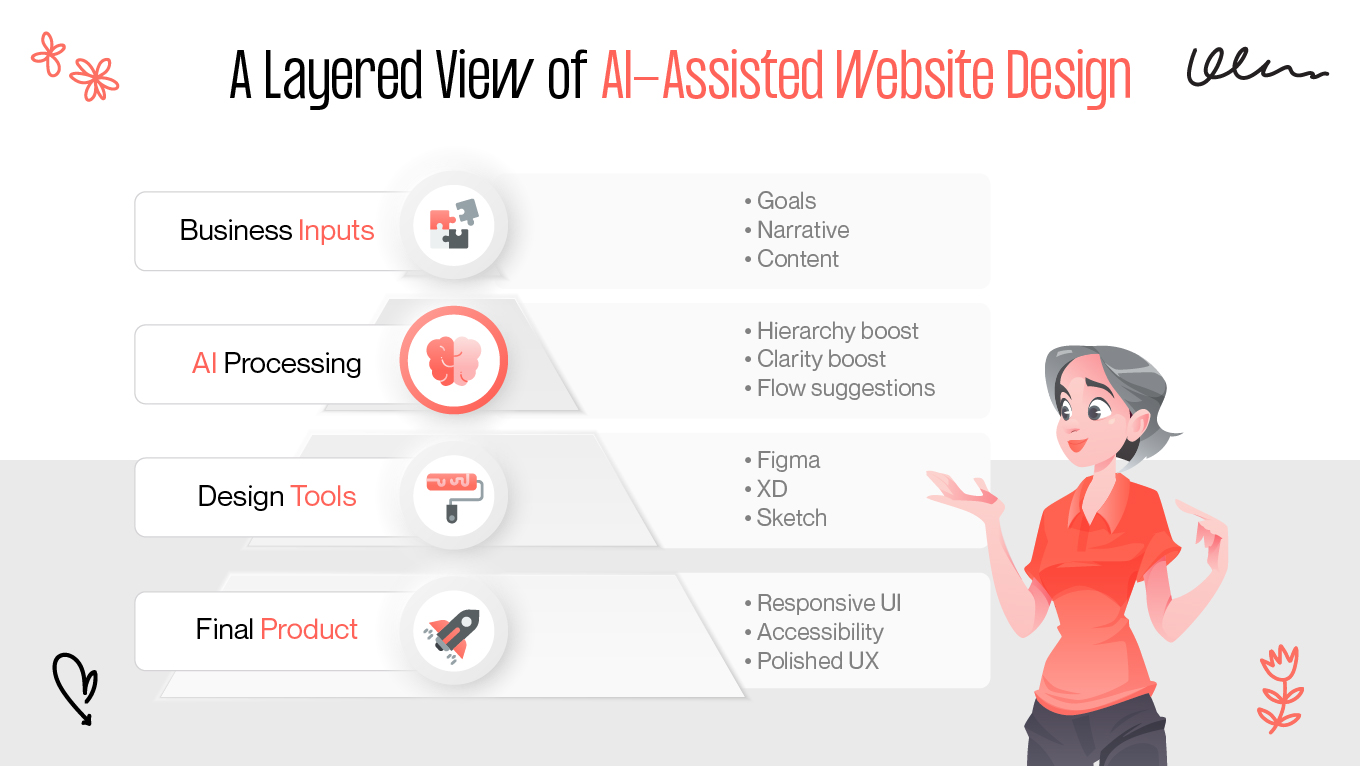
How ChatGPT Fits Into Design Workflows

In modern digital projects, the delay usually happens before Figma even opens. ChatGPT resolves this by transforming vague ideas into actionable design direction. 

It bridges the critical gap between strategy, design, and development, streamlining the decisions that define the product.

Turning Strategy Into Design Files More Efficiently

In our experience, design teams produce their best work when the strategic foundation is already settled: page priorities, content hierarchy, the story the site needs to tell. ChatGPT accelerates this upfront “thinking phase” by organizing information, strengthening narratives, and clarifying user intent.

By the time designers open Figma, they’re no longer guessing what matters or rewriting unclear content. Instead, they can focus on translating a solid strategy into structure, hierarchy, and visual logic.

Improving Cross-Team Communication

Website projects involve multiple disciplines: design, marketing, product, development, and leadership. Each group uses a different vocabulary and prioritizes different outcomes. ChatGPT helps bridge that gap by creating shared language around goals, content, and user journeys.

It can turn technical product descriptions into plain language, refine marketing copy into conversion-driven messaging, and align all stakeholders around the same narrative — before the design team converts it into UI.

When everyone reacts to the same organized content and structure, alignment happens significantly faster and friction drops.

Enhancing Decision-Making Inside Visual Tools

Once ChatGPT has helped shape structure and content, designers can test placement, hierarchy, and usability inside Figma or other tools more efficiently. Instead of filling wireframes with placeholder text or restructuring pages mid-way, they begin with content that already reflects business priorities.

It allows designers to:

  • evaluate hierarchy with real messaging,

  • test alternate flows quickly,

  • validate how much space specific sections require,

  • shorten iteration cycles.

This means fewer design revisions and a more predictable path toward the final UI.

Supporting Image and Asset Creation

ChatGPT itself does not generate visual assets, but it plays a supporting role in shaping the creative direction behind them. It helps clarify the tone of imagery, the style of illustrations, and the visual mood a brand should aim for.

Actual images or graphics are then produced in specialized tools, like Midjourney and DALL·E, or by professional designers who polish details and ensure consistency.

ChatGPT saves time by eliminating vague direction early, but the final visuals still rely on design expertise to ensure quality, brand alignment, and usability.

Practical ChatGPT Prompts for Website Design Planning

ChatGPT cannot replace a professional design team, but it speeds up the preparation. The key lies in using the right prompts. Such inputs clarify business direction and structure content instantly, providing designers with a solid foundation before they even open Figma.

Below is a curated set of practical, non-generic ChatGPT prompts for website design built specifically for messaging and UX planning.

Prompts for Website Structure and Page Planning

  • “Propose a complete website structure for a [industry] company targeting [audience]. Explain the purpose of each page.”

  • “Analyze our current sitemap and identify missing pages that would improve conversion or clarity.”

  • “Create three alternative website architectures: one minimal, one content-heavy, and one conversion-focused.”

  • “Review this website structure and reorganize it to reduce cognitive load for first-time visitors.”

  • “Recommend which pages should be included in the main navigation vs. footer based on user intent.”

  • “Determine which pages a prospect needs to see before they convert from a homepage CTA.”

  • “Split this large, complex service page into a logical multi-page structure.”

  • “Identify weak pages that could be merged, rewritten, or removed entirely.”

  • “Suggest a website structure for a company offering both services and a product.”

  • “Design a website flow optimized for high-ticket B2B leads that need credibility first.”

  • “Propose a lean website structure suitable for an early-stage startup with limited content.”

  • “Compare our current structure with best practices in [industry] and list necessary improvements.”

Prompts for Homepage Strategy

  • “Outline a homepage narrative flow for a company solving [problem] for [audience].”

  • “Identify the top five elements this homepage needs to build trust quickly.”

  • “Rewrite the homepage flow to fit a more performance-driven, conversion-focused approach.”

  • “Create three variations of a homepage structure: credibility-first, product-first, and story-first.”

  • “Suggest how the homepage should change for audiences with low vs. high industry awareness.”

  • “Determine what information should appear above the fold for our target audience.”

  • “Map out how the homepage should guide the user from first impression to CTA.”

  • “Assess this homepage plan and remove anything that distracts from the primary conversion goal.”

  • “Rewrite the homepage structure so it works for mobile-first visitors.”

  • “Integrate social proof into the homepage flow without overwhelming the user.”

  • “Identify friction points in this homepage layout and suggest alternatives.”

  • “Propose a homepage layout that reduces bounce rate for users comparing multiple vendors.”

Prompts for Page-Level Content Clarity

  • “Rewrite this service page into a clearer hierarchy with distinct sections.”

  • “Improve this page to make it more scannable for busy decision-makers.”

  • “Identify jargon and unclear phrases in this content and rewrite them.”

  • “Create a clearer layout for this complex explanation by dividing it into meaningful sections.”

  • “Reduce this long text by 40% while keeping the meaning and impact.”

  • “Find contradictions or repeated ideas in this page and reorganize it.”

  • “Rewrite this page for an audience with low technical knowledge.”

  • “Rewrite this page to strengthen conversion flow and reduce cognitive load.”

  • “Add supporting microcopy to clarify weak parts of the page.”

  • “Fix the information sequence on this page so the logic is easier to follow.”

  • “Optimize this service page for top-of-funnel visitors unfamiliar with our offering.”

  • “Turn this informal content into a polished, enterprise-ready version.”

Prompts for User Journeys and UX Logic

  • “Map the user journey for a visitor researching [product/service] and identify required pages.”

  • “Explain how the website should adapt for users coming from paid ads vs. organic search.”

  • “Create user flow variations for new visitors vs. returning visitors.”

  • “Identify decision points where users may drop off and propose improvements.”

  • “Evaluate whether this journey supports fast decision-making.”

  • “Rewrite the flow so that users see the strongest trust-building content earlier.”

  • “Assign each page a clear objective and expected user action.”

  • “Propose micro-interactions or elements that could reduce user friction.”

  • “Analyze this flow for cognitive overload and suggest simplifications.”

  • “Suggest which pages require personalization for higher conversion.”

  • “Map the journey specifically for enterprise buyers vs SMB customers.”

  • “Transform this linear journey into a more flexible path with fewer blockers.”

Prompts for Content Consistency Across the Site

  • “Unify tone across these pages while keeping a professional, confident voice.”

  • “Rewrite content so terminology stays consistent across all service pages.”

  • “Condense this inconsistent messaging into one clear brand narrative.”

  • “Rewrite each section to maintain the same depth and level of detail.”

  • “Align the voice across pages so all content feels written by one person.”

  • “Remove repeated ideas that appear across multiple pages.”

  • “Normalize headings so page structure follows a consistent pattern.”

  • “Rewrite this set of pages so messaging doesn’t contradict itself.”

  • “Strengthen brand personality in areas where the tone feels too generic.”

  • “Detect where content leans too technical or too simplistic and adjust.”

  • “Ensure all CTA phrasing feels unified across the site.”

  • “Rewrite each page to follow the same narrative logic and conversion flow.”

Prompts for Stakeholder Alignment

  • “Summarize these competing stakeholder opinions into one unified direction.”

  • “Create three versions of the website strategy based on different priorities.”

  • “Identify points of disagreement and propose a compromise structure.”

  • “Rewrite this long chain of feedback into a clear action plan.”

  • “Present the website direction in business language for leadership.”

  • “Explain the strategic risks of choosing each alternative direction.”

  • “Convert conflicting feedback into a consolidated, prioritized roadmap.”

  • “Summarize what decisions must be made before design begins.”

  • “Turn this raw input into a single source of truth document.”

  • “Suggest talking points to align teams around one website vision.”

  • “Identify unrealistic expectations and reframe them constructively.”

  • “Rewrite the strategy to reflect leadership’s top goals without losing clarity.”

Prompts for Pre-Figma Blueprint Creation 

  • “Transform this website plan into a structured, design-ready blueprint.”

  • “Break each page into clear sections with defined objectives.”

  • “Create a detailed hierarchy for each page that designers can translate into layouts.”

  • “List all essential components needed for each page before wireframing.”

  • “Define the UX logic behind every page transition.”

  • “Describe content blocks so they can be placed directly into Figma.”

  • “Turn this sitemap into a wireframe-ready document.”

  • “Highlight which areas require visuals, icons, or data visualizations.”

  • “Prepare a page-by-page list of key messages for designers.”

  • “Organize this content into a logical flow suitable for layout creation.”

  • “Identify what needs stakeholder approval before Figma work starts.”

  • “Turn this messy brief into a clear, structured design specification.”

Add The Professional Design Expertise AI Can’t Replace

As a design studio, we use AI tools daily, so we know exactly where they stop and human skill begins. ChatGPT offers speed, but it cannot automate judgment. The magic of a digital experience lies in the nuance: hierarchy, accessibility, and how the product feels. We take rough AI-generated drafts and fill the critical gaps, ensuring the layout survives real-world content and mobile constraints.

How We Help

We turn rough AI drafts into functional UX. ChatGPT can outline a page, but it doesn't understand friction or visual weight. We refine those raw ideas into systems that work for users.

  • Systems, not screens: AI produces isolated ideas. We build design systems that scale, defining components, patterns, and accessibility standards.
  • Solving complexity: From multi-level navigation to product architecture, we handle the heavy lifting that AI misses.
  • Designing for behavior: Algorithms don't see your analytics. We design based on how people actually use your product, ensuring the final experience is grounded in reality, not just syntax.

We don't view AI as a magic shortcut. We see it as a powerful tool to get us (and you) moving faster. But speed isn't everything. While algorithms handle the start, we take full responsibility for the finish, ensuring the final digital experience is built to succeed.

Create a website design with Gapsy!

Ready to enhance your online presence? Let's work together.

Final Thoughts

ChatGPT is proving to be a powerful accelerator in the early stages of website creation. It helps teams move faster on structure, messaging, and stakeholder alignment. Nonetheless, it doesn’t replace UX strategy, brand interpretation, or the precision of a real design system. Think of it as an assistant that speeds up the thinking, not a tool that delivers a complete, business-ready website on its own.

Raw ideas need professional hands. Gapsy Studio bridges the gap between a ChatGPT draft and a launch-ready solution. We add the strategy and nuance required to build user-centered products that live up to business standards.

If you’re ready to combine AI efficiency with expert design execution, our team can help you move from early planning to a website that truly works for your brand — let’s talk.

Rate this article

21 ratings
Average: 4.9 out of 5

If you like what we write, we recommend subscribing to our mailing list to always be aware of new publications.

Table of contents

desktop bannermobile banner

Need a design expert?

Do you have any questions? We tried to answer most of them!